APPS & SOFTWARE
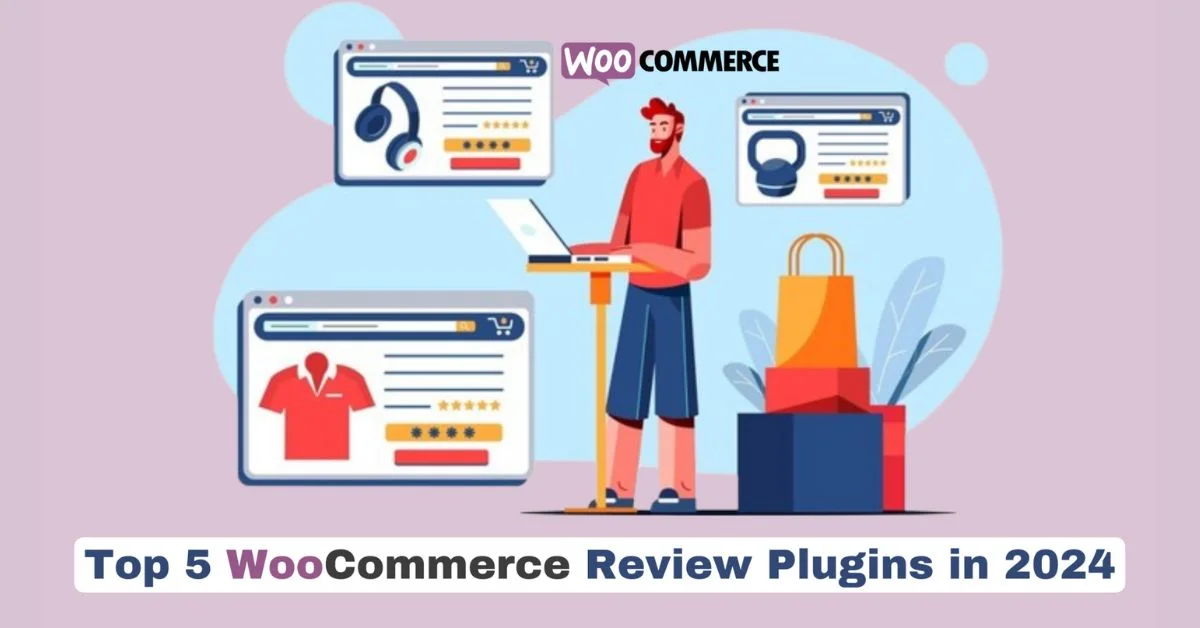
Top 5 WooCommerce Review Plugins in 2024

The digitally-driven e-commerce industry is competitive. There can be several e-commerce stores in the same business as you are. Therefore, it has now become indispensable to build trust and credibility with your customers.
This is where customer reviews come into the picture. It is one of the most effective ways to attain trust. You require to encourage your customers to share reviews. And you also need to showcase them on your product pages.
WooCommerce is a popular e-commerce plugin for WordPress. You can find a variety of powerful Review Reminder for WooCommerce plugins to elevate your online store.
Why do Reviews Matter in E-commerce?
Studies highlight that a whopping 88% of consumers trust online reviews. These reviews hold as much value as personal recommendations.
Positive reviews act like social proof. These reviews can convince potential buyers that your products are worth their money.
Influencing Decisions
Reviews can offer significant insight into your products.
Customers often rely on reviews to make their purchase decisions. Through reviews, your customers can understand product quality, performance, and value.
Infact, well-drafted reviews can address common questions and concerns. This offers customers a clear idea of your product.
Magento extensions for e-commerce can also help you integrate reviews within your e-commerce store.
SEO and Visibility
Reviews can positively impact your SEO (Search Engine Optimization). During website ranking, search engines consider user-generated content like reviews.
Rich snippets with star ratings in search engine results can grab your customer’s attention. These can increase click-through rates.
Valuable Insights
Reviews provide valuable customer feedback. You can gain insights into what customers love about your products.
You can even identify areas for improvement. Ultimately, you can use this information wisely to enhance your offerings.
You can also consider readymade Magento extensions for e-commerceto add reviews to your Magento store.
Driving Growth
Positive reviews lead to happy customers. It results in repeat business. Consequently, you can notice increased sales.
Reviews can also attract new customers. Reviews help online visitors to see the positive experiences of others.
How to Choose the Right WooCommerce Review Plugin?
The best WooCommerce review plugin for your store depends on your specific needs and budget.
This is also true if you want to integrate payment plugins such as the Payment Gateway Worldline.
Here are some factors to consider when making your choice:
Features
Consider the functionalities that are most important to you.
These can include:
- photo/video reviews,
- automated reminders through
- Google Customer Reviews integration and
- customization options.
You can also integrate WooCommerce SMS Notifications & OTP Verificationplugin to make the shopping experience holistic for your customers.
Ease of Use
If you are a beginner, opt for a plugin with a user-friendly interface. Ensure that the integration instructions are clear.
Free vs. Premium
Many plugins offer two version. One is a free version with basic features. And another one a premium version with advanced functionalities.
Evaluate your needs. Weigh the cost-benefits before you upgrade.
Ratings and Reviews
Read reviews from other WooCommerce store owners. This will help you get insights into the plugin’s performance.
You can also know it’s ease of use. Additionally, you get an idea about the customer support quality.
Top 5 Review Reminder Plugins For WooCommerce
1. Review Reminder for WooCommerce
The Review Reminder for WooCommerce plugin simplifies the review generation process. It sends automated and polite email reminders to your customers.
These reminders encourage your customers to share their insights on the products they have purchased.
It’s an easy and hassle-free solution to increase your review numbers.
Features
- Automatic Reminders: No need to nag customers yourself! This sends review requests after their order is complete.
- Flexible Scheduling: Change your mind on the timing? No worries. You can adjust it when these reminders are sent.
- Say it Your Way: Personalize the email content. You can match it to your brand voice. This encourages more reviews.
- Easy Manual Reviews: For those who prefer, you can enable customers to leave reviews directly from their order details page.
- Plays Well with Others: Works smoothly with your WooCommerce store and other plugins you might be using.
Along with this plugin, you can also use WooCommerce SMS Notifications & OTP Verification. It can send review reminders via email.
2. Judge.me Product Reviews for WooCommerce
Judge.me focuses on creating a visually appealing review experience. It boasts features like rich snippets, social sharing buttons, and customizable review widgets.
Additionally, Judge.me offers automated email requests for reviews. This feature helps in encouraging customer participation.
Features
- You can create a visually appealing review section
- Send automated review reminder emails
- Share your reviews socially using social sharing functionalities
3. ReviewX
ReviewX is another feature-packed premium plugin. With this plugin, you can get both photo and video reviews.
Features
- You can include both photo/video reviews
- You can integrate your store with Google Customer Reviews
- You can implement gamification to incentivize reviews
4. Site Reviews
You can find both free and premium versions of site reviews.
With the free version you can get basic text reviews and ratings. The premium version offer photo and video reviews.
Features
- Text, photo, and video reviews are available.
- Integrates with Google Seller Ratings.
- Customizable review forms.
5. Customer Reviews
It’s a free plugin by WooCommerce. This plugin presents a user-friendly option for beginners. Your customers can submit text reviews and ratings for your products.
You can even moderate reviews before they are published. It also offers disable option. You can diable certain reviews on specific products if needed.
Features:
- Simple and easy to use
- Integrates seamlessly with WooCommerce
Additional Tips for Encouraging Customer Reviews
Review Reminder for WooCommercecan be a great tool for e-commerce businesses. But you can use these following strategies to encourage your customers to post a review.
Make it Easy to Leave Reviews
Clearly display a “Leave a Review” button on product pages. Consider offering incentives. These can include loyalty points or discounts for leaving reviews.
Respond to Reviews
Actively respond to both good and negative reviews. Thank customers for positive feedback. Address concerns raised in negative reviews professionally.
Showcase Reviews Prominently
Display positive reviews strategically on your website. Strategic positions may include product pages, home pages, and category pages.
Use Reviews in Marketing
Include positive customer reviews in your marketing materials. These can include email campaigns, social media posts, etc.
Wrapping Up
Reviews are an amazing way to build trust and credibility in your store. Along with review reminders you can use WooCommerce SMS Notifications & OTP Verification to offer the best shopping experience to your customers.


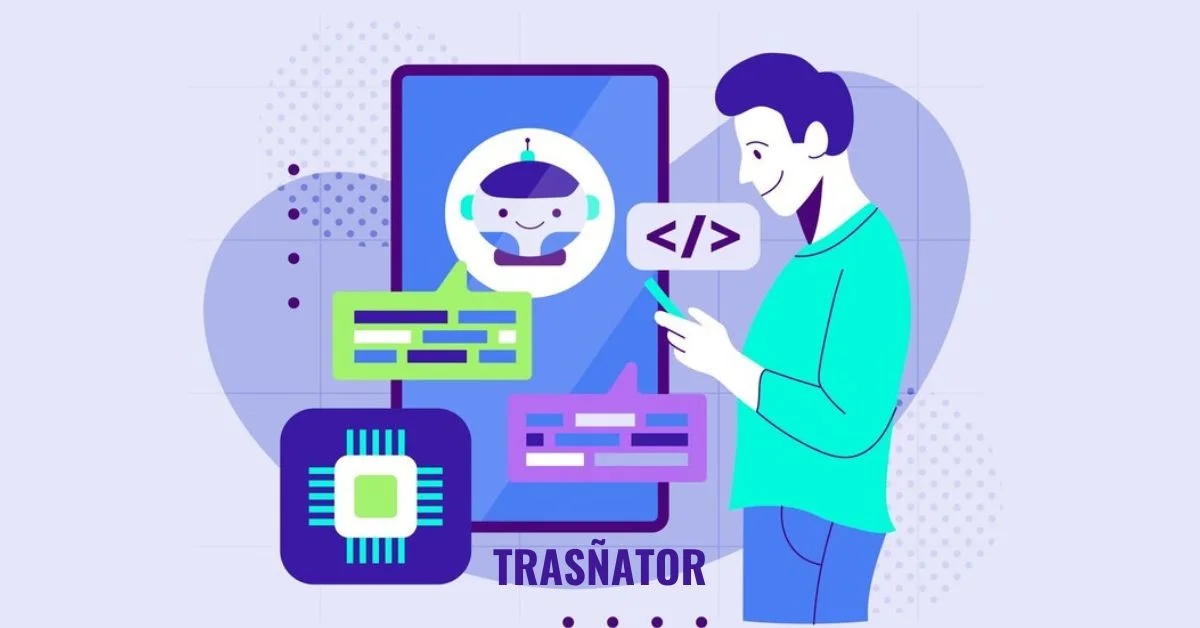
In today’s interconnected world, language barriers are no longer a hindrance thanks to advancements in technology. One such innovation that has revolutionized the way we communicate across languages is Trasñator. In this article, we delve into the intricacies of Trasñator, exploring its history, functionality, applications, and future trends.
Introduction to Trasñator
Trasñator is a cutting-edge language translation tool designed to facilitate seamless communication across diverse linguistic landscapes. It employs state-of-the-art algorithms and artificial intelligence to translate text from one language to another with remarkable accuracy and efficiency.
History and Evolution
Early Beginnings
The concept of automated translation dates back to the mid-20th century when researchers began exploring ways to utilize computers for language translation tasks. Early attempts relied on rudimentary rules-based systems and lacked the sophistication of modern translation tools.
Technological Advancements
Over the years, advancements in computational linguistics, machine learning, and neural networks have propelled the evolution of translation technology. Trasñators represents the culmination of decades of research and development in the field of natural language processing.
How Trasñator Works
Trasñator operates on a complex framework that analyzes input text, identifies linguistic patterns, and generates accurate translations. Its functionality can be broken down into several key components:
Core Functionality
At its core, Trasñators utilizes machine learning algorithms to understand the structure and semantics of text, enabling it to produce contextually relevant translations.
Language Recognition
Trasñators boasts robust language recognition capabilities, allowing it to identify the source language of the input text automatically.
Translation Process
The translation process involves parsing the input text, generating a corresponding representation in the target language, and refining the output to ensure grammatical correctness and semantic coherence.
Key Features and Benefits
Trasñator offers a host of features and benefits that make it a preferred choice for individuals and businesses alike:
Multilingual Support
Trasñator supports a wide range of languages, enabling users to translate text seamlessly across linguistic boundaries.
Accuracy and Precision
With its advanced algorithms and neural network models, Trasñators delivers translations that are highly accurate and faithful to the original meaning.
Ease of Use
Trasñator’s user-friendly interface makes it accessible to users of all proficiency levels, allowing for effortless translation with just a few clicks.
Applications of Trasñator
Trasñator finds applications in various domains, including:
Personal Use
Individuals use Trasñator to translate text for personal communication, travel, and language learning purposes.
Business and Professional Use
Businesses leverage Trasñators for document translation, international communication, and localization of content for global audiences.
Comparison with Other Translation Tools
Strengths and Weaknesses
Trasñator’s strengths lie in its accuracy, multilingual support, and user-friendly interface. However, it may struggle with complex linguistic nuances and idiomatic expressions.
Unique Selling Points
What sets Trasñators apart is its ability to adapt to evolving language trends and its commitment to continuous improvement through feedback and user data analysis.
Challenges and Limitations
Despite its advancements, Trasñator faces certain challenges and limitations:
Linguistic Nuances
Translating idiomatic expressions, cultural references, and nuanced language poses challenges for automated translation systems like Trasñators.
Contextual Understanding
Trasñator may struggle to grasp the context of ambiguous phrases or sentences, leading to inaccuracies in translation.
Future Trends and Developments
Looking ahead, the future of Trasñators is marked by:
AI Integration
Further integration of artificial intelligence and machine learning techniques promises to enhance Trasñator’s performance and accuracy.
Enhanced Performance
Continued research and development efforts aim to address existing limitations and improve Trasñator’s ability to handle complex linguistic tasks.
Conclusion
In conclusion, Trasñator represents a significant milestone in the realm of language translation technology. Its advanced features, multilingual support, and ease of use make it an indispensable tool for bridging linguistic divides in our increasingly globalized world.
FAQs
Is Trasñator free to use?
Trasñators offers both free and premium subscription plans, with the latter providing access to advanced features and higher translation limits.
Can Trasñator translate audio or video files?
Trasñators primarily focuses on text-based translation and does not support direct translation of audio or video content. However, users can transcribe the audio content and then translate the text.
How accurate is Trasñator compared to human translators?
While Trasñators delivers impressive accuracy, it may not match the nuanced understanding and contextual interpretation capabilities of human translators, especially in specialized fields or creative content.
Does Trasñator offer real-time translation during conversations?
Trasñators offers a text-based translation interface and does not support real-time speech translation. However, users can type or paste text for instant translation.
Is Trasñator compatible with all devices and platforms?
Trasñators is accessible via web browsers and mobile apps, making it compatible with a wide range of devices and platforms.
Digital video files sometimes get corrupted due to reasons like incomplete downloads, hardware issues, software errors, improper handling, etc. When your cherished video files get corrupted, you need to apply proper corrupted video file repair methods to restore your original video content. Luckily, there are several video repair methods available that you can try to repair corrupted video files on your Windows system without needing professional help.
In this comprehensive guide, we will explore some DIY methods to help you learn how to repair corrupted video files on Widows. Just go with these methods one by one to repair your video file and also consider the preventive measures mentioned in this article to avoid such problems in the future.
Why Video Files Get Corrupted on Windows?
Before you apply methods to fix corrupted video files on your Windows device, it is important to find the exact reason for this corruption. Here are some common reasons why video files may get corrupted on Windows:
- Incomplete Downloads: Interrupted or incomplete downloads of video files can cause corruption as essential data may be missing or incomplete.
- Software Errors: There may be problems with your video player software or codecs, which can cause errors during playback, resulting in corrupt or damaged video files.
- Hardware Problems: Faulty hardware components, including hard drives or memory cards, can corrupt stored content, including your video files.
- Power Outages: Sudden power failures or improper shutdowns of your Windows device while working with video files can corrupt/damage the data due to incomplete writing or saving processes.
- Virus or Malware: Viruses or malware infections on your Windows system can damage video files, causing corruption or inaccessibility.
Whatever is the cause of corrupt video files, you need to use a professional video repair software or apply manual methods (which we will discuss in the following section) to repair your corrupted video files
How do I Repair Corrupted Video Files on Windows PC Using Video Repair Tool?
If you are looking for a quick and easy method to repair corrupted video, then you can use a professional video repair tool. Stellar Repair for Video is an all-in-one video repairing software which allows you to repair video files corrupted due to multiple reasons. You can fix your videos corrupted or damaged due to incomplete downloads, hardware issues, software errors, and virus infections.
You can use the Stellar Repair for Video tool to repair corrupted videos stored on multiple devices, including external hard drives, USB flash drives, SD cards, and many more. The software is known for several amazing features, which include:
- The software supports repairing corrupt or unplayable video files of multiple file formats, including MP4, MOV, AVI, MKV, ASF, WMV, M4V, 3G2, 3GP, and many more.
- It provides “Advanced Repair” option for easy repairing of severely corrupt videos.
- Allow you to preview the repaired video file before saving it on your device.
- Fix corrupt videos shot from popular camera brands, such as Canon, Nikon, Sony, etc. along with mobile phones and other devices.
- This video repair software is available in multiple versions, check their features and select the one that best suits your requirements.
Here’s how to repair corrupted video files on Windows using the Stellar Repair for Video tool:
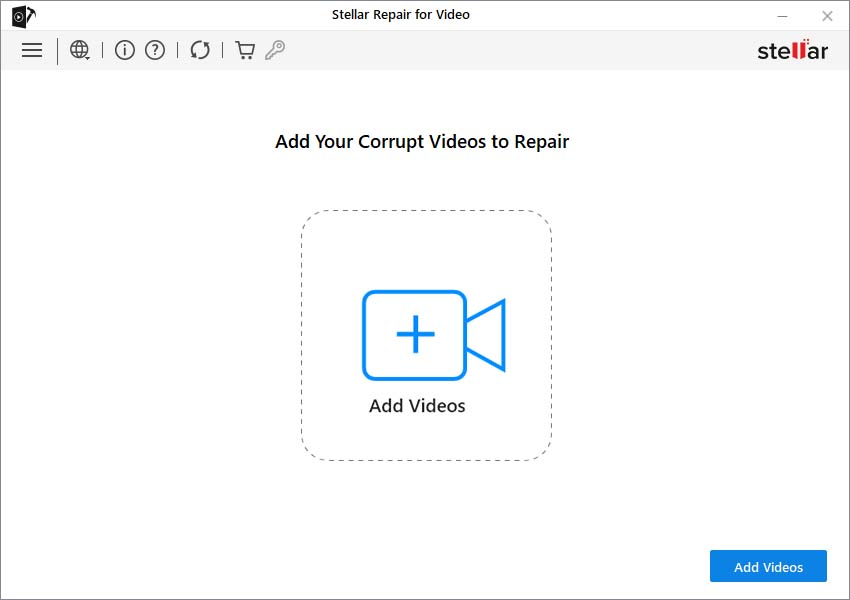
Step 1: Download and install the Stellar Repair for Video tool on your Windows device. Launch the software and from the homepage, click Add Videos and upload the videos that you need to repair.
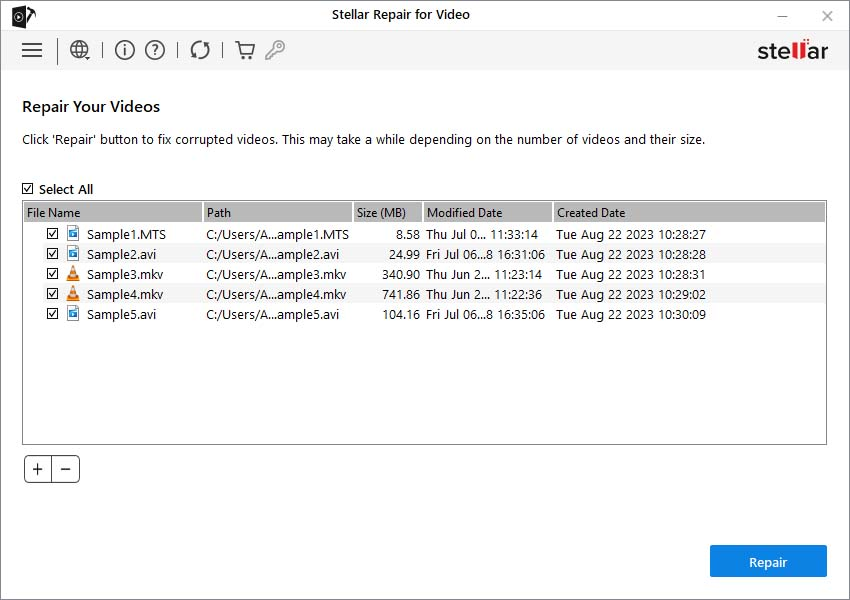
Step 2: Now, click Repair to start the repairing process. Wait till the process gets completed.
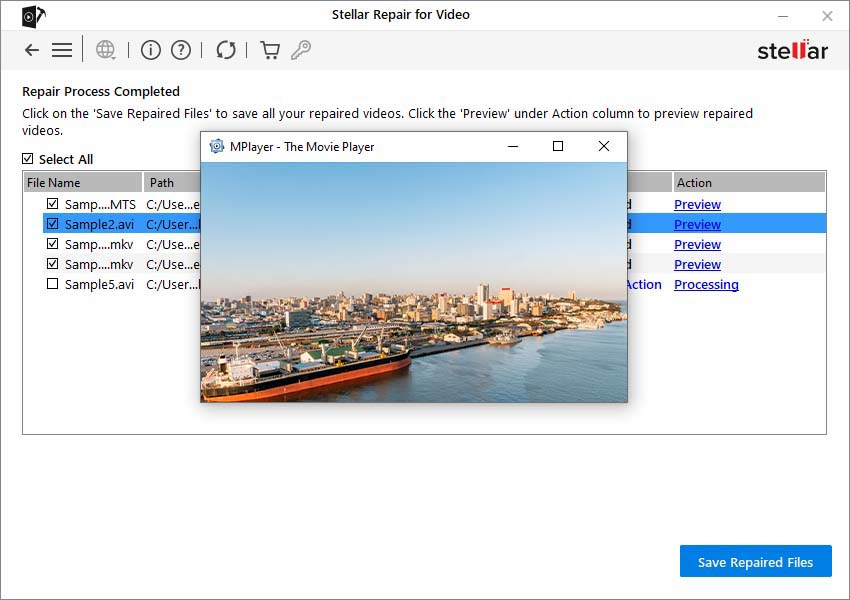
Step 3: Once the repair is completed, all the repaired files will appear on your screen. Preview the repaired videos and select the ones that you need to recover. Lastly, click the Save Repaired Files button to save selected files at the desired location.
Other Alternatives to Repair Corrupted Video Files on Windows Using VLC Player
Along with the above-mentioned steps to repair corrupt video files using a professional video repair software, you can also try other alternatives. You can use Windows built-in VLC media player tool to repair corrupted videos in multiple ways. Let’s explore these methods in detail:
Method 01: Transcode Corrupt Video Files Using VLC Media Player
You can transcode your corrupt videos using VLC player to make them playable on unsupported media players. This method best suits to fix video files corrupted or damaged due to incompatible or missing codecs. Go through the following corrupted video file repair steps to repair your video files by transcoding them:
- Launch the VLC media player and go to Media > Convert/Save.
- Click Add to upload the corrupted video file that you need to transcode.
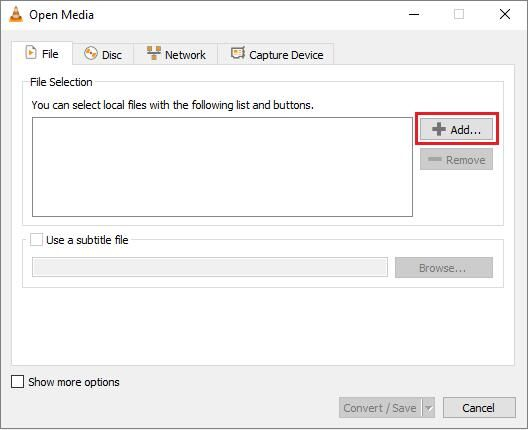
- Now, click Convert/Save. In the Covert window, enter a file name and location next to the Destination file option.
- Choose the desired input codec from the Profile list. Also, tap the Edit Selected Profile button to change the specified profile settings.
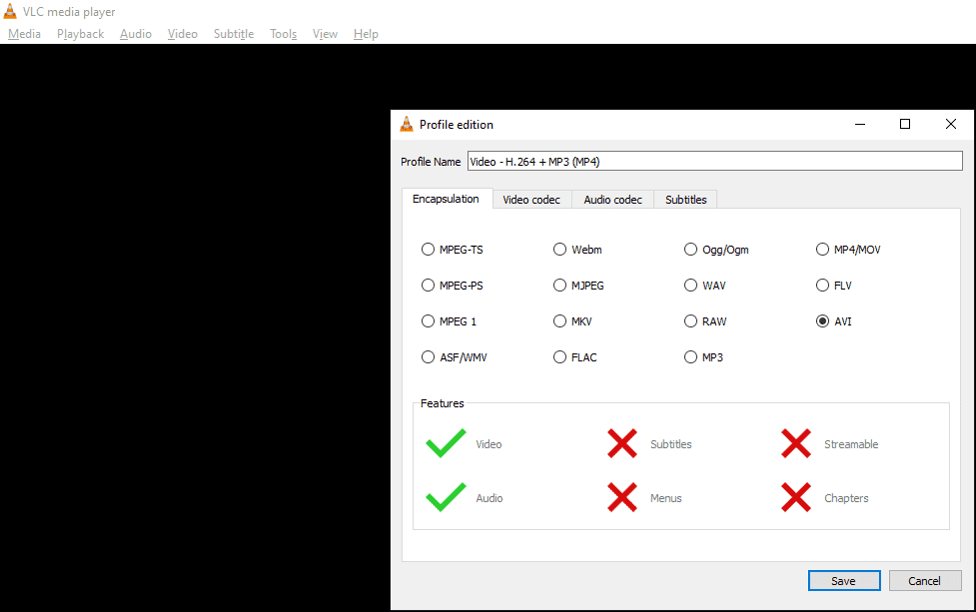
- Lastly, click the Start button in the conversion window to begin the transcoding process.
Method 02: Increase the Cache Values in VLC
Increasing cache values in VLC allows you to adjust the buffer size allocated to store data temporarily during playback. This prevents interruptions by providing a smoother streaming experience.
Higher cache values provide more buffer space, reducing the playback disruptions which usually occur due to network fluctuations. Go through the below-given steps to repair corrupted video by increasing its Cache value:
- Open VLC Player, and go to Tools > Preferences.
- Scroll down and in the Show Settings section, select the All option.
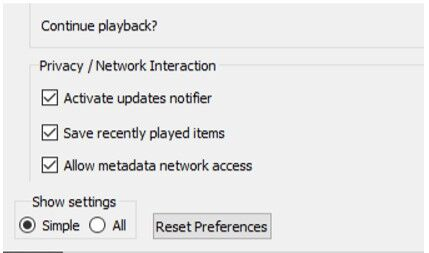
- Now, click on Input/Codecs. From the right navigation pane, go to the Advanced section.
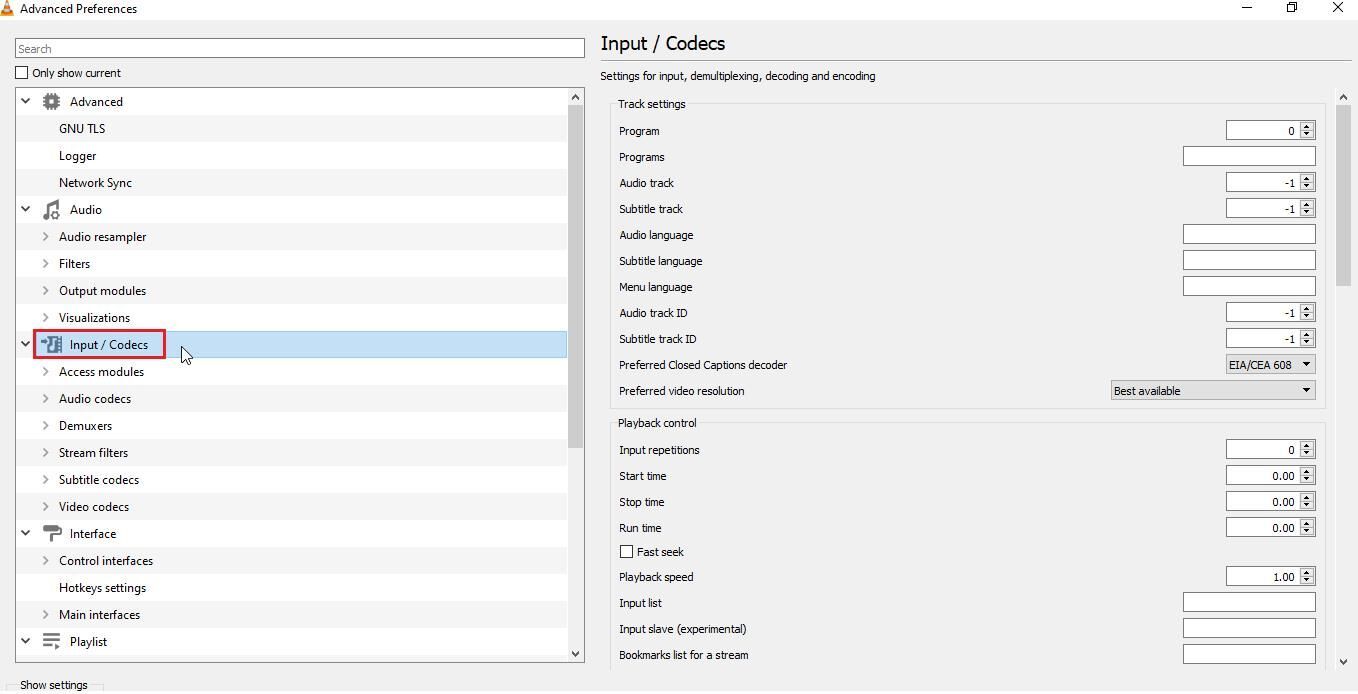
- Under Advanced, change the value next to the File Caching (ms) box ranging from 300 to 1000 or more.
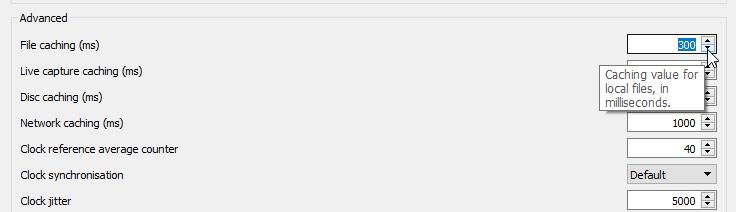
- At last, click Save and restart your VLC player.
Method 03: Change Video Output Settings in VLC Player
Last in our list of how to repair corrupted video files on Windows using an in-built VLC player is by changing your video output settings. This method best suits to fix unplayable or distorted MP4 or MOV videos in a few simple clicks. For this:
- Launch VLC Player and navigate to Tools > Preferences.
- Click Video and from the Video Settings window, change the drop-down menu next to Output settings from Automatic to DirectX (DirecDraw) video output.
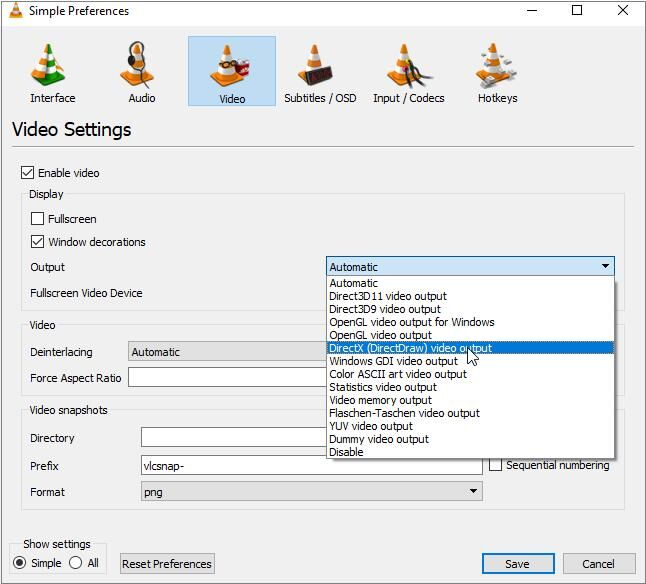
- Once done, click Save to save the changes and then restart VLC.
After successful completion of the above steps, try playing your corrupt video file in VLC.
Preventive Measures to Avoid Video Corruption Issues
Here are some additional tips that you can consider to avoid video corruption issues on Windows devices:
- Regular Backups: Maintain backups of your video files on an external drive or cloud location, like Google Drive, Google Cloud, etc. to mitigate loss in case of corruption.
- Safe Downloads: Make sure your videos are properly downloaded and transferred to prevent corruption during transfer.
- Quality Hardware: Use reliable storage devices and ensure proper ventilation to prevent hardware-related corruption.
- Updated Software: Keep the video player software and codecs installed in your video player updated to prevent compatibility issues and errors.
- Software Compatibility: Ensure compatibility between video editing software and file formats to prevent corruption during editing processes.
Wrapping Up
Hope, the above-mentioned DIY methods help you learn how to repair corrupted video files on Windows devices. Start the corrupted video file repair process by using Windows built-in VLC media player, which allows you to repair corrupt videos in multiple ways. Then move to third-party video repair software like Stellar Repair for Video tool for easy and quick repairing of your videos. Remember always to create backups of your important videos to prevent loss in case of corruption.

A well-designed user interface in a medical app is one of the most important variables that determines the success of an app. Here you’ll see ideas and strategies for creating high-quality UI designs for these types of apps.
Today you can find about 145,000 health and fitness apps, but chances are many of them have a lot of problems. It might be a good idea to start working on an application that will compete well and beat out other similar ones. However, you need to make a lot of effort to stand out among competitors and get loyal and satisfied customers.
UX/UI design at the head
The influence of UX is greater in the healthcare business than in other industries. According to many findings, UX contributes 50% to acquire a competitive edge and 33% to client retention rates. A top-tier UI/UX design may transform a healthcare app into an excellent lead-generation tool.
The main purpose of healthcare app design is to make the application accessible to all users. As a result, a sensitive target population may create certain design constraints – if you can overcome them, you’ll have an on-demand healthcare service.
How to Design Healthcare Mobile Apps
Before you start creating an app design, you need to know who your target audience is and what their geographical, socio-demographic, and psychological qualities are, since no product can cater to everyone. Users’ interests and capacities influence how they engage with an application.
Investigate other medical apps design
This stage also includes research, but it is more focused. Let’s call it competitive research. Check out what applications are already on the market before developing a useful product. Analyze leading medical apps, test them, and identify best practices. It is not about copying, but about gaining an understanding of what features are often included in a comparable product. Analyze market needs and consider what vital app features will match these criteria, what the app lacks, and what you can do to make the product easier and more helpful.
You have to guarantee that what you do is relevant and valuable to the consumers and also has the ability to quickly repurpose if something happens. As a result, your software will stand out from the crowd of comparable items.
Focus on the app functionality
When the first two processes have been completed, it is time to design the functionality. In most medical app designs, practicality and usability take precedence above aesthetics. Consider a strategy for instructional onboarding when developing a healthcare app to make the UI intuitive and assist users to avoid irritation with the user experience. Make all the basic functions in 2-3 clicks, this will increase user success.
Create a navigation plan
A simple navigation system is a must-have component for every product design. Proper navigation implies speed and usability. Doctors and patients should be able to obtain critical information quickly since it is a matter of health and life. Simple elements like the hamburger menu, tab bar, or navigation drawer enhance the user experience and the clarity of each button will enable the user to quickly find and select the services they need.
Test before release
Testing is a thorough part of creating mobile healthcare apps as it ensures the reliability, accuracy and security of the app. Thorough testing and QA is extremely important as any error or glitch in a healthcare app can lead to serious consequences such as wrong diagnosis, incorrect treatment suggestions or dangerous situations where patient data is jeopardized. Thanks to full-fledged medical software testing, developers can fix bugs in time. As well as security weaknesses, compatibility and usability issues will be eliminated before the app is dropped to users. This process improves the overall performance and usability of the app.

Keep things simple
Simplicity is the key to a good UX design for mobile health applications. Others may call this technique minimalistic. If you look at the top-ranking healthcare apps on the market, you’ll realize that they all have one thing in common: a simple or minimalistic design. There are several advantages to using a simple design. One of them is to provide users with a clean and professional environment. Isn’t that what you’re looking for during clinical visits? It should be your objective if you want to improve the UX of healthcare software.
Define the color palette
In general, the color scheme of an app is determined by the target demographic and the topic of the app. This article has some information about the topic.
The bulk of healthcare app designs is done in neutral colors, with a predominance of cold-toned blue and green colors, with white for the backdrop. Designers do so to accomplish certain goals, such as using the popular link of calming pastel hues with the healthcare business, reducing fear, and increasing trustworthiness.
Conclusion
The ability to provide value to the end user and solve business problems, including the use of colors and fonts throughout the journey, is what design is all about. Health, fitness, diet, illness, consultations, medication reminders, heart rate and oxygen monitoring – this is all a delicate and complex issue that requires careful and comprehensive consideration. Designers must constantly try to combine the very high standards of security and usability of medical applications with the aesthetics of their interfaces in order to achieve their goals of building the best medical applications in their niche.




 HOME IMPROVEMENT1 year ago
The Do’s and Don’ts of Renting Rubbish Bins for Your Next Renovation
- BUSINESS1 year ago
Exploring the Benefits of Commercial Printing

 BUSINESS1 year ago
Brand Visibility with Imprint Now and Custom Poly Mailers
- HOME IMPROVEMENT9 months ago
Get Your Grout to Gleam With These Easy-To-Follow Tips
- TECHNOLOGY11 months ago
Dizipal 608: The Tech Revolution Redefined
- HEALTH9 months ago
The Surprising Benefits of Weight Loss Peptides You Need to Know
- HEALTH9 months ago
Your Guide to Shedding Pounds in the Digital Age

 HEALTH12 months ago
Happy Hippo Kratom Reviews: Read Before You Buy!